We all love to take screenshots of some items on our various
handheld device screens. Sometimes, it’s a page on a browser, it sometimes is a
funny picture on Instagram. Screenshots now dominate our daily mobile
technology usage. Gone are the days of picking a notepad and pen to take notes
from a website. Some mobile operating systems don’t have this but are able to
do this magic with the aid of applications. An example is the Screen Grabber
and Screen Muncher on OS 7.1 of the BB. Devices like android and BB10 do this without
the need for such softwares. Today, I would be showing us how to take
screenshot of Windows PC running OS 8 and 8.1. You can try it on other versions
of Windows. Vista, XP and 7. Hard to find one of those things around me.
STEPS
1. Prepare the page you want to take a screenshot off. Ensure every
document or item is well enlarged, highlighted or as you choose.
2. Look on your keyboard and locate the Print Screen key, on my
HP here, it is written as “ prt sc “,just
beside my Function keys.
Found it? Bravo, now press and hold the windows Logo button
on the keyboard and press the " prt sc "
key we found earlier. Mathematically, the equation should be
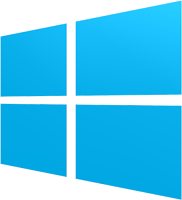
+ prt sc = screenshot
3. The screen should flash and you are done. Attached to this
post is a screenshot of me using MS Word in editing this post.
4. Now, check in your Pictures folder, a screenshot folder
containing your screenshots would be waiting for you. Have fun. I hope this
increases our creativity.


 We all use chargers of different shapes, sizes, colors and
designs. We only worry about getting a full charge and don’t have a full scoop
of what the USB cord actually entails. Some of us even deal with problems of
slow charging on your devices and some even have USB cords that once were used
to transfer files and now can only charge your device.
We all use chargers of different shapes, sizes, colors and
designs. We only worry about getting a full charge and don’t have a full scoop
of what the USB cord actually entails. Some of us even deal with problems of
slow charging on your devices and some even have USB cords that once were used
to transfer files and now can only charge your device. 
.png)


